

Your delivery team shouldn't find out about a new project on the day it starts. The handoff between sales and delivery is where IT outsourcing companies lose time, margin, and client goodwill. A deal closes on Thursday, the PM finds out on Friday, someone creates a Jira project on Monday, and by Tuesday the client is asking when they can expect the first standup. Three days gone on setup that should have taken three minutes. Synthelio connects your CRM directly to delivery — when a deal closes, the project is already there.
Key capabilities:
• CRM integration — connectHubSpot, Salesforce, or Pipedrive; auto-create project on Closed Won
• Project portfolio view —all active projects with health status, billing type, and end date in one table
• CRM Deals tab — weightedpipeline chart by month, deal stage, probability, and expected close date
• Project Groups — multipleprojects under one client account, total FTE and project count per group
• Statements of Work — linkedto project, account, CRM deal, and PO; PDF download; status tracking
• Billing types — T&M,Fixed Price, Investment, and Organizational running simultaneously
Synthelio connects to HubSpot,Salesforce, and Pipedrive. Once connected, deals sync in real time. When a dealmoves to Closed Won, Synthelio creates the project automatically. The fieldsmapped from the CRM deal to the Synthelio project include:
• Client name and account
• Deal amount — used as theproject budget
• Expected close date — usedas the project start date
• Deal name — becomes theproject name
• CRM deal ID — linked to theSynthelio project for traceability
A Statement of Work ispre-populated from the deal data and linked to the project immediately. The SoWcan be edited before being sent to the client, and its status is trackedthrough Draft and Signed stages.
For companies who close deals butdon't want full automatic project creation, the CRM Deals tab in Synthelioshows all pipeline deals with a one-click option to convert any deal into aproject manually.
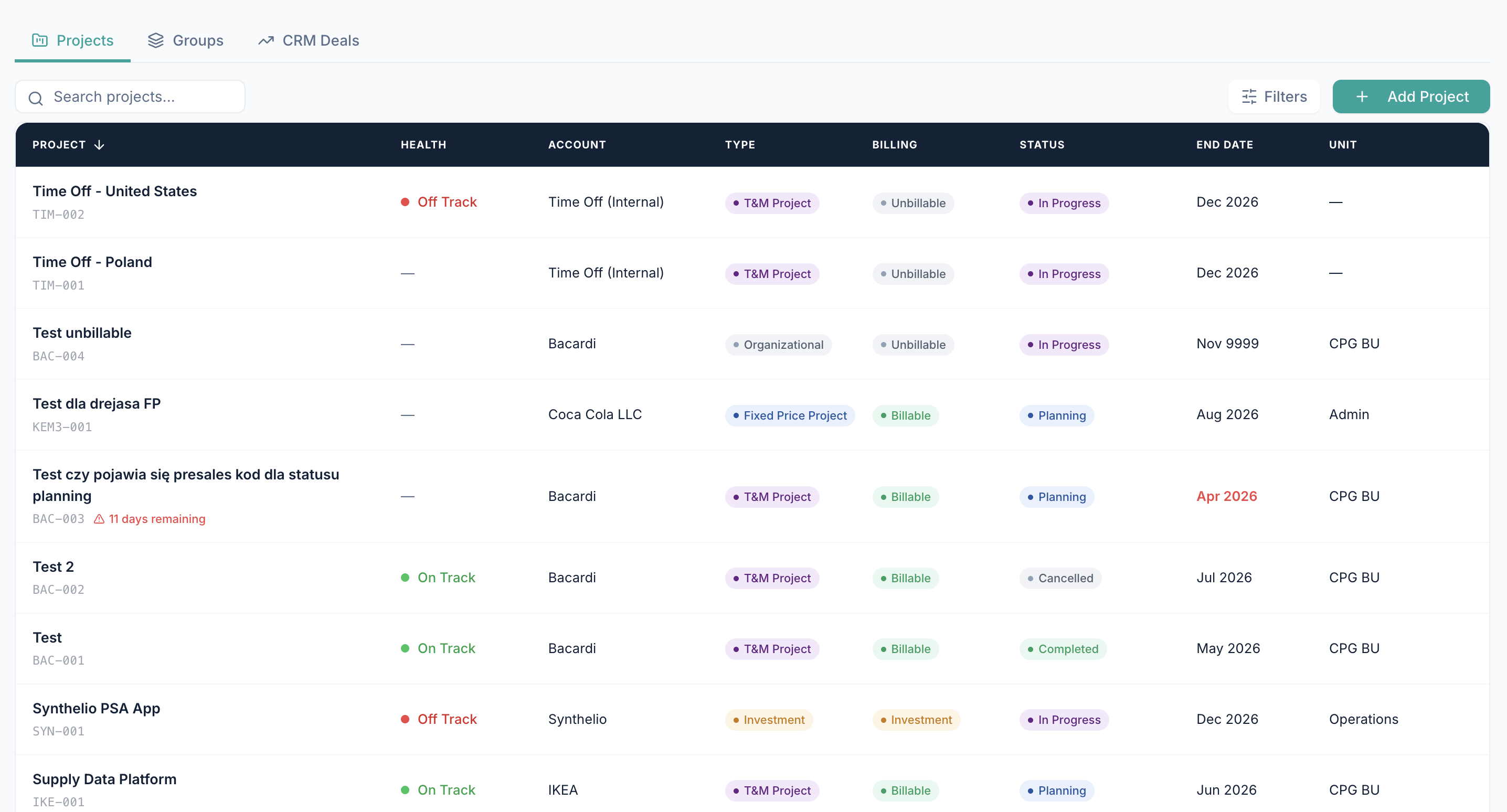
The Projects view shows your fullportfolio in a single table. Every active, planning, and recently completedproject is visible — with the information that matters most accessible withoutclicking into each project:
• Project name and code
• Account (client)
• Billing type: T&M,Fixed Price, Investment, or Organizational
• Billing status: Billable orUnbillable
• Project status: InProgress, Planning, Completed, Cancelled
• Health indicator: On Trackor Off Track
• End date
• Organisational unit
Projects can be filtered bystatus, billing type, unit, account, and health indicator. The search boxfilters by project name or code. The view is sortable by any column.
The Health indicator (On Track,Off Track) is set manually by the project manager or delivery lead. It acts asa simple signal visible to leadership without requiring them to open individualprojects.
A Project Group in Synthelio is acollection of projects running under the same client account. Groups are usefulwhen you have multiple concurrent engagements with one client — for example,four separate projects for Bacardi running simultaneously.
The Groups view shows:
• Group name
• Organisational unit
• Client account
• Group manager
• Number of active projectsin the group
• Total FTE allocated acrossthe group
This gives account managers anddelivery leads an account-level view of the relationship — without having toadd up projects individually. It also makes it easy to assign ownership of aclient relationship to a single group manager.
The CRM Deals tab shows the dealpipeline synced from your connected CRM — HubSpot, Salesforce, or Pipedrive.For each deal, Synthelio displays:
• Deal name and link to thelive CRM record
• Account (client)
• Stage (as defined in theCRM — e.g. Demo, Proposal, Negotiation, Closed Won)
• Probability percentage
• Expected close date
• Deal amount
• Weighted value (amount ×probability)
Above the deal list, a 6-monthweighted pipeline chart shows the distribution of weighted deal value byexpected close month. This lets delivery and finance plan resources and cashflow against the pipeline — before contracts are signed.
The last synced timestamp isvisible on the page. Synthelio refreshes CRM data regularly, and the sync canalso be triggered manually.
Statements of Work in Synthelioare linked to the account, project, and CRM deal. Each SoW stores:
• SoW name
• Account (client)
• Amount and currency
• Status: Draft or Signed
• Valid period: start dateand end date
• Link to the CRM deal
• Link to the Purchase Order
SoWs can be downloaded as PDFsdirectly from Synthelio. The status change from Draft to Signed is tracked witha timestamp. When an invoice is generated, it references the SoW to pull thebilling rates — so the connection from signed contract to invoice is automaticand traceable.
Synthelio supports four projectbilling types:
• T&M (Time &Materials): invoiced from approved timesheet hours multiplied by the SoW rate.This is the standard billing model for IT staff augmentation.
• Fixed Price: invoiced on amilestone basis. The project has a fixed budget and invoicing is triggered bymilestone completion rather than time logged.
• Investment: internalprojects that represent an investment by the company — not billed to a client.Used for internal product development or internal tooling.
• Organizational: overheadprojects — time off, internal meetings, administration. Not billed to a client.
All four types can runsimultaneously in Synthelio. An IT outsourcing company can have 12 T&Mprojects, 3 Fixed Price projects, 2 Investment projects, and a Time Off projectall active at the same time, with each type handled correctly in timesheets,resource management, and financials.
Duis dui nibh, dapibus vitae elementum nec, accumsan sed ex. Maecenas euismod turpis eget arcu elementum ultricies.
Your delivery team shouldn't find out about a new project on the day it starts. The handoff between sales and delivery is where IT outsourcing companies lose time, margin, and client goodwill. A deal closes on Thursday, the PM finds out on Friday, someone creates a Jira project on Monday, and by Tuesday the client is asking when they can expect the first standup. Three days gone on setup that should have taken three minutes. Synthelio connects your CRM directly to delivery — when a deal closes, the project is already there.

Sed sagittis tempor erat, in rutrum odio lobortis sit amet. In finibus purus et lectus ultricies, vitae tempor odio venenatis.
Duis eget lorem in neque volutpat maximus. Ut lobortis aliquam maximus. Nam dignissim dictum leo ut rutrum.
Vivamus sagittis ligula ut nisi dignissim hendrerit. Nullam interdum ligula lorem, maximus sodales dolor molestie ut.

Aenean viverra ex ante, id vestibulum velit congue non. Vestibulum quis ante quis erat gravida scelerisque. Morbi tempor orci quis tempus aliquet. Nullam vitae elit et ligula ultrices ornare ac non justo.
Maecenas tempor, odio sit amet vestibulum finibus, lacus erat tempor massa, nec aliquet nulla dolor quis tellus. Mauris mattis sapien quis ultrices dictum. Morbi sed iaculis ex.
Suspendisse mollis sem vel sapien iaculis, et iaculis libero vestibulum. Pellentesque dui libero, blandit pulvinar sapien et, consectetur dapibus massa.
Nam vitae quam tortor. Phasellus molestie mauris sit amet maximus mattis. Suspendisse convallis sapien nisi, vitae vestibulum augue posuere vitae. Fusce posuere tincidunt sodales.
Morbi euismod libero congue sem bibendum pulvinar vitae a odio. Sed non dui lobortis, accumsan purus in, laoreet tortor. Suspendisse eu faucibus nisl. Suspendisse pulvinar ut sapien eu dictum.
Visit our support page or contact our support team.
Donec venenatis nunc sit amet orci tempor, id feugiat ligula dapibus. Sed quis nibh vitae magna aliquam consectetur nec ac elit.



.svg)

.svg)