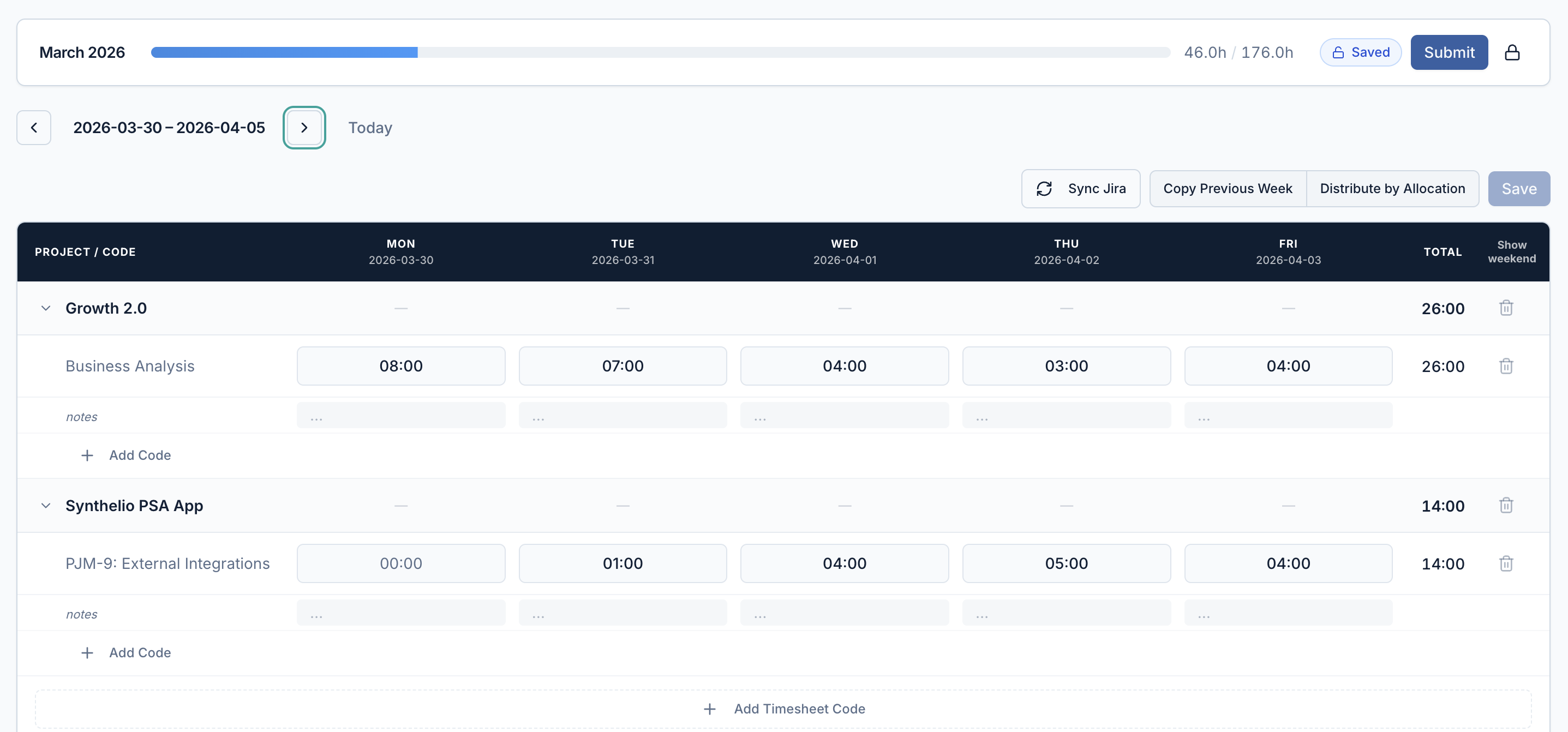

Your team shouldn't spend 20 minutes figuring out what to log time against. The most common time tracking problem in IT outsourcing isn't that people don't log time — it's that the system makes it harder than it needs to be. Employees stare at a blank timesheet trying to remember project codes, log against the wrong project, fill in Friday from memory. The data that comes out is inaccurate, late, and expensive to fix. Synthelio connects timesheets to allocations — employees open their timesheet and their projects are already there. Two minutes, not twenty.
Key capabilities:
• Pre-filled timesheets —projects from allocations appear automatically; no searching for codes
• Jira sync — one click pullsJira time entries into the timesheet; ticket codes preserved; no double entry
• Distribute by Allocation —splits weekly hours across projects proportionally with one click
• Copy previous week —duplicates last week's structure for employees on long-running projects
• Manager approvals — allteam timesheets in one queue; monthly submission progress visible per employee
• Timesheet to invoice —approved hours flow directly into Financials; no manual transfer or export

The Synthelio timesheet is aweekly grid. Rows are projects; columns are days of the week. The rows arepre-populated from the employee's current allocations — projects appearautomatically when an allocation is created, and disappear when it ends.
Within each project row, theemployee can add timesheet codes — corresponding to Jira epics, tasks, orbilling categories. Each code can have hours entered per day and a notes fieldfor client-facing reporting or internal context.
Two features reduce data entrysignificantly:
• Copy previous week:duplicates the previous week's project and code structure. The employee justupdates the hours. Useful for people on long-running projects with consistentweekly patterns.
• Distribute by Allocation:automatically splits the week's hours across projects proportionally, based onallocation percentages. One click instead of manual arithmetic.
Synthelio connects to Jira. Whenan employee clicks Sync Jira in their timesheet, Synthelio pulls in all timeentries logged in Jira for that week. The Jira ticket code appears as atimesheet line item. Hours are populated from the Jira time log. The employeereviews and submits.
There is no double entry.Developers keep using Jira exactly as they normally would. Synthelio picks uptheir time entries without any change to their workflow. Jira ticket codes arevisible in the Synthelio timesheet, which means they can be referenced ininvoice line items for client reporting.
Jira sync and manual time entrywork side by side. If a developer logs some time in Jira and manually adds timefor a meeting or internal work, both appear in the same timesheet.
The Approvals tab in Synthelioshows all submitted timesheets across the manager's team in one queue. For eachemployee, the manager can see:
• The submitted timesheet forthe period
• Monthly submissionprogress: hours logged vs. monthly target
• Which timesheets have beensubmitted and which are still pending
The manager can approve atimesheet with one click. If there is an issue, they can add a commentexplaining why the timesheet was rejected — the employee sees the comment intheir timesheet and can correct and resubmit.
Approved hours are immediatelyavailable in the Financials module. No export, no manual transfer, noreconciliation step. The approved timesheet is the source of truth forinvoicing.
Administrators can view thetimesheet for any employee using the Viewing as dropdown in the Time Trackingmodule. This allows admins to check submission status, help with corrections,and get an organisation-wide view of time logging completeness without askingindividuals to send screenshots.
The monthly progress bar at thetop of the timesheet shows hours logged this month versus the expected monthlytarget. The target is calculated automatically from the number of working daysin the month multiplied by the employee's FTE percentage.
The connection from timesheet toinvoice in Synthelio is automatic. Once a timesheet is approved, the hours areavailable in the Financials module. When an invoice is generated for a project,Synthelio takes the approved hours, applies the billing rate from the linkedSoW, and creates invoice line items with no additional input from finance.
If timesheets for a billing periodhave not been approved, Synthelio flags this before the invoice is generated.Finance cannot inadvertently invoice against unapproved hours.
Duis dui nibh, dapibus vitae elementum nec, accumsan sed ex. Maecenas euismod turpis eget arcu elementum ultricies.
Your team shouldn't spend 20 minutes figuring out what to log time against. The most common time tracking problem in IT outsourcing isn't that people don't log time — it's that the system makes it harder than it needs to be. Employees stare at a blank timesheet trying to remember project codes, log against the wrong project, fill in Friday from memory. The data that comes out is inaccurate, late, and expensive to fix. Synthelio connects timesheets to allocations — employees open their timesheet and their projects are already there. Two minutes, not twenty.

Sed sagittis tempor erat, in rutrum odio lobortis sit amet. In finibus purus et lectus ultricies, vitae tempor odio venenatis.

Duis eget lorem in neque volutpat maximus. Ut lobortis aliquam maximus. Nam dignissim dictum leo ut rutrum.

Vivamus sagittis ligula ut nisi dignissim hendrerit. Nullam interdum ligula lorem, maximus sodales dolor molestie ut.
Aenean viverra ex ante, id vestibulum velit congue non. Vestibulum quis ante quis erat gravida scelerisque. Morbi tempor orci quis tempus aliquet. Nullam vitae elit et ligula ultrices ornare ac non justo.
Maecenas tempor, odio sit amet vestibulum finibus, lacus erat tempor massa, nec aliquet nulla dolor quis tellus. Mauris mattis sapien quis ultrices dictum. Morbi sed iaculis ex.
Suspendisse mollis sem vel sapien iaculis, et iaculis libero vestibulum. Pellentesque dui libero, blandit pulvinar sapien et, consectetur dapibus massa.
Nam vitae quam tortor. Phasellus molestie mauris sit amet maximus mattis. Suspendisse convallis sapien nisi, vitae vestibulum augue posuere vitae. Fusce posuere tincidunt sodales.
Morbi euismod libero congue sem bibendum pulvinar vitae a odio. Sed non dui lobortis, accumsan purus in, laoreet tortor. Suspendisse eu faucibus nisl. Suspendisse pulvinar ut sapien eu dictum.
Visit our support page or contact our support team.
Donec venenatis nunc sit amet orci tempor, id feugiat ligula dapibus. Sed quis nibh vitae magna aliquam consectetur nec ac elit.